It’s Tuesday evening. I only want to know one thing: do my two kids have homework for tomorrow?
In Denmark that question goes through Aula, the platform every public school and most daycare centres use to talk to parents. In Aula it goes like this. First MitID, the national digital ID. Then the front page with posts from the school, from after-school care and from the class. Then I find the widget with the weekly plan, which opens Meebook, one of the vendors schools pick for lesson plans. The homework is in there, mixed in with the teachers’ notes about what the class is working on that week. And then I do the whole thing again for child number two.
It’s easy to get annoyed with Aula. I have been. But the more I’ve looked at it, the more I’ve come to think that Aula has been given a job nobody can do.
For everyone is for no one #
Aula has to work for every parent with a child in public school, and for a large share of daycare. For teachers, pedagogues and heads of school. For pupils from the youngest classes up. On a phone on the bus and on a computer at the office. For parents with one child and parents with four. For divorced parents who need to see the same thing from two addresses. For people who are dyslexic, and people whose first language isn’t Danish.
And Aula has to do all of it at once: messages, calendar, timetable, drop-off and pickup times, reporting a child sick, posts, photos and consent forms. On top of that come the widgets from whichever vendors the school has chosen. The weekly plan lives in Meebook at one school and in Min Uddannelse or EasyIQ at the next.
Every single feature is something someone needs. And that same feature is noise to everyone else. For parents of a toddler in daycare, what matters is drop-off and pickup, and photos. For me, with two kids in lower secondary, it’s homework and substitute lessons. For a teacher it’s something else entirely.
A user interface that has to be for everyone ends up being a little for everyone and not really for anyone. That isn’t bad craftsmanship. It’s a sum that doesn’t add up. You cannot make one front page that is the right front page for all of those people.
So Aula can’t win. Whatever it does, it is too much for some and too little for others.
My own way in #
So what I was missing wasn’t a better Aula. I was missing a view into it that shows only what I need.
Luckily, others have done the hard part. Aula has no official API to build on, but scaarup/aula has been pulling data out of Aula into Home Assistant for years. And Casperjuel/aula-mcp has rebuilt the entire MitID login without a browser. Both are open source, and without them I couldn’t have built this in an afternoon.
I reuse the login from aula-mcp and wrote the rest as a module for Nushell, the shell I use for almost everything. Every command returns a table:
> aula lektier
╭───┬───────┬───────────┬───────────┬──────┬─────────────────────────╮
│ # │ child │   date    │  subject  │ kind │           text          │
├───┼───────┼───────────┼───────────┼──────┼─────────────────────────┤
│ 0 │ A     │ Wed 28/10 │ English   │ task │ 6 grammar exercises     │
│ 1 │ O     │ Wed 28/10 │ Danish    │ task │ Read up to chapter 4    │
│ 2 │ O     │ Thu 29/10 │ Maths     │ task │ Hand in: weekly task 3  │
╰───┴───────┴───────────┴───────────┴──────┴─────────────────────────╯(Lektier is Danish for homework. Some of the commands kept the Danish words Aula itself uses.)
There are commands for the things I actually use: aula lektier, aula ugeplan, aula calendar, aula presence, aula threads and a few more. Because the result is a table, I can ask the questions Aula has no button for. Which lessons have a substitute this week?
aula calendar --week | where status == substitute | group-by childAula will never get that button. It only matters to some of us, and for everyone who doesn’t need it, it’s just one more button.
One page for a tick #
The terminal works for me, but not at the dinner table. So on top of the module I built a small web page that runs on my own machine. It shows the two kids side by side, A on the left and O on the right, with their homework for this week and next.
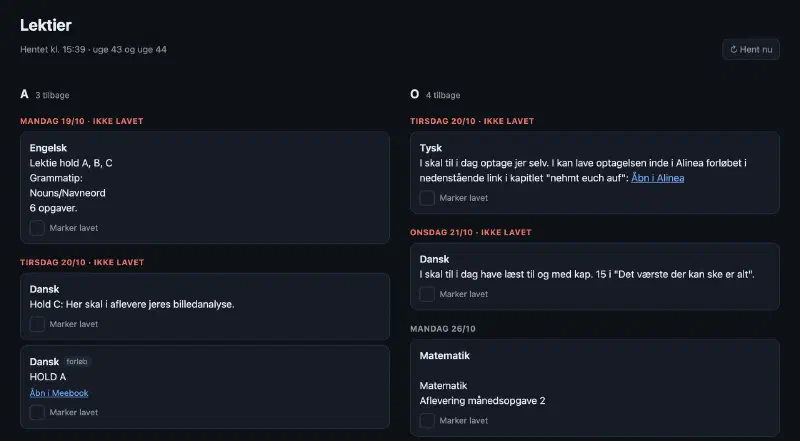
Next to each piece of homework there is a button: Mark done.
That is the only new thing the page does, and it’s exactly what Aula has no place for. In Aula, homework is a message from the teacher. On my page it is also a task that gets done. If homework from an earlier day is done, it disappears. If it isn’t, it stays, under a red heading. Anything that turned up since yesterday is marked “new”.
The division of labour is simple. Aula owns the homework. Every half hour the page fetches it and stores a snapshot. The page owns only the ticks, and it stores them as a log of what happened: done, undone, done again. That log is cross.stream, and the server is http-nu, both written by Andy Gayton. The page itself is rendered on the server and updates live, so it is the same on the phone and on the computer.
Everything runs on my own machine. The MitID access sits in my Mac’s keychain, and the kids’ school data never leaves the house.
Give us data, not a better front page #
I don’t think the answer is for Aula to design its way out of this. It can’t be done. Every time someone gets the feature they were missing, the front page gets a little heavier for everyone else.
If something has to be for everyone, maybe the best user interface isn’t a user interface. It could be proper access to the data: a documented API, so parents, associations, apps and people like me can build the small way in that fits their own everyday life. Mine is two columns and a tick. Another parent’s would look completely different.
Until then, it’s enthusiasts like the people behind scaarup/aula and aula-mcp who keep the door ajar. They do it in their spare time, and every time Aula bumps its API version, they have to patch things up. That’s a fragile foundation for something every school parent in the country is required to use.
Have you built your own way into Aula, or would you like to? Then send me an email. I’d love to hear what your front page would show.